Top modules
Test kit · HLK-LD2410B · Bluetooth + serial

LD2410B Test Kit

An LD2410B set up for the bench: connect it to a computer, watch every distance gate live, and learn the radar before you design it into anything.

  • ModuleHLK-LD2410B with Bluetooth
  • PurposeEvaluation and tuning from a computer
  • RangeUp to 5m, ±60° coverage
  • Accuracy±0.375m distance
  • TuningBluetooth app or serial port
  • Supply5V DC maximum
Great for
  • Learning the LD2410 before committing a design
  • Logging raw serial frames on a laptop
  • Tuning with the PC configurator instead of a phone
Not for
  • Mounting in a room as-is: move the module to a real build
  • Several rooms: bare modules or packs cost less per sensor
Get the module

Tune an LD2410B from your laptop on day one

The LD2410B test kit exists so your first evening with the radar goes on learning it, not on wiring it. Hi-Link's test kits pair the module with the parts needed to reach a computer over USB-serial; the exact adapter board varies from kit to kit. Plug in, open the configurator, and the radar is on screen.

The module is a standard HLK-LD2410B: 24GHz radar, 5m range, ±60° coverage and Bluetooth. That means you get two ways in from the start:

  • Serial: the PC configurator at 256000 baud, with live energy for every distance gate and full control of thresholds.
  • Bluetooth: the HLKRadarTool phone app, handy once the module is propped up across the room.

A first session worth doing:

  1. Connect the kit, open the tool, pick the COM port and set 256000 baud.
  2. Sit in front of the radar and watch the moving and still energy climb in the gate you are in.
  3. Walk back one step at a time. Each 0.75m moves you one gate further.
  4. Leave the room and note which gates still show energy with nobody there.
  5. Raise those gates' thresholds, cap the farthest gate, and save.

Twenty minutes of that teaches you more about the LD2410 than any spec sheet. You see how the still-energy reading follows small movements like breathing, how a fan lights the near gates, and how far the radar reaches through a door.

Download the configurator and phone app, and read the firmware notes, via setting up the LD2410 tool. If the tool will not connect, check the COM port, the baud rate, and that no serial monitor is holding the port open.
Datasheet

Board details

SpecValue
ModelHLK-LD2410B
Kit typeBluetooth test kit
Frequency band24GHz ISM
DetectsMoving and stationary people, with target distance
Maximum sensing distance5m
Distance resolution0.75m per gate
Measurement accuracy±0.375m
Coverage±60°
Module size7 × 35mm
Maximum supply voltage5V DC
OutputsDigital OUT pin and UART
Default baud rate256000, 8N1
BluetoothYes
ConfigurationBluetooth or serial port; sensing range division
MountingCeiling or wall
Weight10g

Read the raw frames at 256000 baud

A test kit on a laptop is the best way to see the LD2410 protocol itself. Open any serial terminal that supports 256000 baud, 8 data bits, no parity, one stop bit, and switch it to hex view. The radar streams report frames continuously.

Per Hi-Link's serial protocol document, the frames are easy to pick out:

  • Report frames start with F4 F3 F2 F1 and end with F8 F7 F6 F5.
  • Command and reply frames start with FD FC FB FA and end with 04 03 02 01.
  • A target-state byte in each report reads 00 for no one, 01 for moving, 02 for still, 03 for both.
  • Moving and still distances and energies follow in the same frame.

To change settings from your own code, you wrap commands between an enable-configuration command and an end-configuration command. The same sequence is what ESPHome and the Arduino libraries send under the hood.

ModeWhat the frame carriesUse it for
BasicTarget state, distances, energiesNormal operation
EngineeringPlus energy for every gateTuning and debugging

Engineering mode is where the test kit earns its keep. Log a few minutes of per-gate energy with the room empty and then occupied, and you have real numbers for your room to set thresholds from, instead of guesses.

The UART runs at 3.3V logic. If you swap the kit's adapter for another USB-serial board, set that board to 3.3V before connecting it to the module.

Pin functions and power figures are on the LD2410 pinout page, and the protocol basics sit in the datasheet summary.

Among the others

Its place in the range

LD2410 sensor models by type, September 2026. Highlighted: LD2410B Test Kit.

Move the module from the kit into your final build

The kit is a bench tool, not a finished sensor. Once you know the radar, the LD2410B comes off the kit and goes into your project, or you keep the kit as a permanent tuning rig and fit fresh modules in the field. Either way, the settings you saved stay in the module.

Moving the module to an ESP32 build:

  1. Note your saved thresholds, farthest gates and no-one delay from the tool.
  2. Disconnect the kit and wire the module: 5V, GND, module TX to board RX, module RX to board TX.
  3. Flash ESPHome with the ld2410 component at 256000 baud.
  4. Confirm presence in Home Assistant, then fine-tune thresholds there or over Bluetooth.
uart:
  rx_pin: GPIO16
  tx_pin: GPIO17
  baud_rate: 256000
  parity: NONE
  stop_bits: 1

ld2410:

binary_sensor:
  - platform: ld2410
    has_target:
      name: Presence

The B's pads are fine pitch, so plan how you connect it in the final build:

  • Solder thin silicone wires straight to the pads for a slim install.
  • Use a fine-pitch header and socket if you want to swap modules.
  • Keep the kit's connection for bench work and buy a pinned LD2410B-P for the build.

Full YAML with thresholds and a Bluetooth switch is on the ESPHome page, and per-board UART pins are on the wiring page. For enclosure ideas, see LD2410 cases.

Keep the kit itself. When a mounted sensor misbehaves months later, a spare module on the kit lets you compare readings in the same room and tell a tuning problem from a faulty board.

Swap options

Other boards to try

Laptop link, breadboard pins1 LD2410C module
LD2410C module
An LD2410C bundled with a CH340 USB-serial adapter gives the same PC tuning with a 2.54mm header.
  • LD2410C · 3-pack
  • Bluetooth: tune it from your phone
  • 24GHz radar: sees people sitting still
Get the module
Longer-range test kit2 JMT LD2410-AA module
JMT LD2410-AA module
The JMT LD2410-AA kit evaluates Hi-Link's 9m presence radar, with ceiling mounts up to 6m.
  • LD2410-AA · 1 module
  • 24GHz radar: sees people sitting still
Get the module
Straight to production3 LD2410B Bluetooth module
LD2410B Bluetooth module
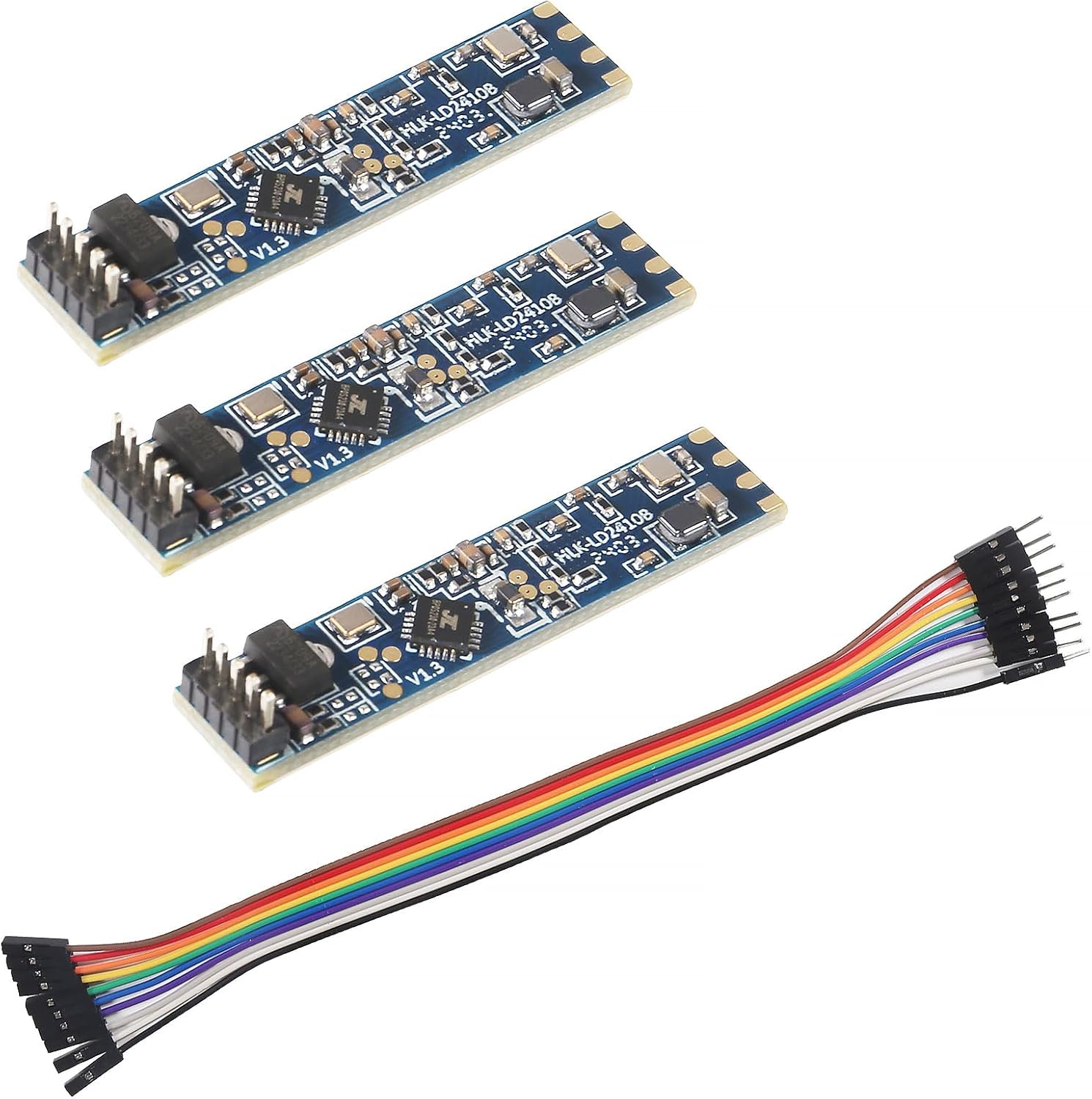
Three LD2410B strips with pins and a cable, for when you already know the radar.
  • LD2410B · 3-pack
  • Bluetooth: tune it from your phone
  • Cable included
Get the module

Buy the kit once, then bare modules after

One test kit covers a whole project. The kit gives you the laptop connection and a module to learn on; every sensor after that can be a bare board, a pinned B-P or a C in a pack. Both test kit versions carry the same HLK-LD2410B and Bluetooth.

The two test kit versions are the same kit under slightly different names; either one lands the same parts on your desk. The part that pays off is having one on the bench before the first sensor goes on a wall: a kit makes every later module faster to set up, because you already know which gates your rooms light up and which thresholds hold a still person.

What to buy after the kit, by build:

Next buildModuleWhy
Slim install behind a coverLD2410BSame board you learned on
No soldering, slimLD2410B-PPins fitted
Breadboard or perfboardLD2410C2.54mm header
Battery powerLD2410S3.3V, low power, own protocol

Skip the kit if:

  • You only need one sensor and plan to tune it from a phone. A bare B or C does that.
  • You already own a 3.3V USB-serial adapter. Wire it to any B or C and you have the same laptop link.
  • You want a finished sensor. The AKAMATIS v2.2 is an LD2410B already built into one.

Take the kit if:

  • You are designing a product and need to log raw frames.
  • You want to understand the gates before choosing between versions.
  • You prefer a big screen to a phone for tuning.

The version comparison, B against C and the rest, is on LD2410B vs LD2410C.

Troubleshooting

Wiring questions

What is the LD2410B test kit for?

Connecting the LD2410B to a computer so you can tune it with the PC tool, watch every gate and log raw serial frames.

Does the test kit module have Bluetooth?

Yes. It is a standard HLK-LD2410B, so the HLKRadarTool phone app works alongside the serial connection.

Can I use the kit's module in a permanent build?

Yes. Settings are saved on the module. Move it to your ESP32 build, or keep the kit as a tuning rig and fit new modules.

What baud rate does the LD2410B use?

256000 baud, 8 data bits, no parity, one stop bit by default.

Best LD2410